
There probably has not been any other time when making a website has been easier.
Today I shall guide you on making your own website from scratch. In this guide we will focus for most on making a WordPress site but we will also take a tiny peek for some other website platforms that you might be interested to use or maybe you want to even code a site on your own.
Things that you would usually need to build a website:
1. An idea and a plan for your website.
2. Domain name: Your own web address for your site.
3. Web hosting: Service that provides the space where you can build your site on.
4. Website platform e.g. WordPress, wix, squarespace.
Making a website should always start from an idea and a plan of what you would like your site to be. Domain name and web hosting in some form are mandatory for your site to be fully accessible for other web users. If you are familiar at coding with html and css, website platform isn’t always needed but it is very recommended to use.
So let’s begin with…

#1 An Idea and a plan
When there is a want to make a website usually there already is an idea for it. In any case if you would like to have more, there is some ideas for you to use:
1. Affiliate blog
2. How-to-do site
3. Learning website
4. Listing site for specific niches
5. Product review site
6. Service website
7. Small online shop
Planning for a website can be done in many ways. You can make your plan in anyway that suits for you but there is some questions you could think about when planning a website:
1. What is your site’s target audience?
2. What kind of competition there is for your site? E.g. search with google.
3. What kind of content you want for your site to have. E.g. Make a map for specific pages you might have on mind.
4. How can visitors find your site? E.g. you could plan some keywords that match your site to use with SEO so your site could be better found with search engines.

#2 Domain name and Web hosting
So for a next step. Your site needs a domain name and web hosting to be accessible to visitors.
Price for most domain names vary from $10 to $15/year. Sometimes you can also get your domain for free with some premium website builders and along side of your web hosting for the first year.
Price for reliable web hostings for new sites vary from $2.5 to $15/month. Web hosting is a service that stores and hosts your website content on a secure server.
There is some specific requirements for web hosting when hosting a WordPress-site. So you need to make sure that web hosting you choose has at least next features:
• Unlimited or unmetered bandwidth
• Included free domain with SSL
• Email accounts
• WordPress support with One-click Install feature
• 24/7 Support
WordPress has recommended Bluehost as a top hosting company. So for this guide it’s recommended to use Bluehost.com as web hosting and for domains. Their plans start from $2.5/month.
Let’s continue with the step-by-step guide.
Step 1: Visit Bluehost (link) and click on “Get Started”

Step 2: Now you can choose your hosting package. Basic plan is good for new sites.

Step 3: Choose and register a doman name that you would like for your site (free for the first year). Page will give you a message on yellow background if domain name is already taken. If you already have a domain name you can use it on right side.

Step 4: Next fill out basic account information, choose any add-on services that you want from package section, provide your payment information, check terms agreement and click ”submit”.
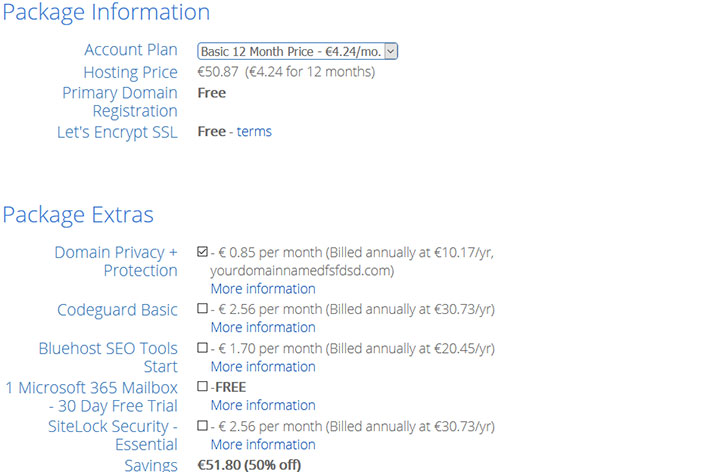
Step 5: After you are done your registration it will take a few minutes to get access to bluehost’s control panel. Click “Create Account”. Create password for a site and check terms agreement. Make sure to save the password to somewhere safe. You will receive an email with details on how to login to your web hosting control panel (cPanel) if you need to login there later. Flow the instructions on the page.
#3 Install WordPress
Now that previous steps to get your domain name and web hosting are done, the next thing to do is installing the content management system (CMS).
This guide recommends using WordPress that is very popular CMS and is used by 35% of all websites in the world. There are also other bit less popular CMS’s that you might want to look for E.g. Joomla and Drupal.
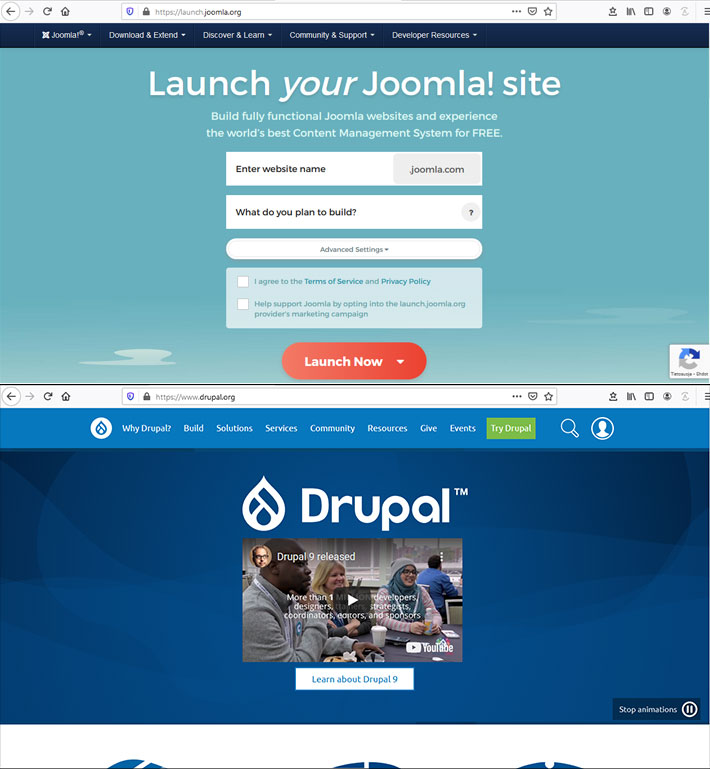
If you don’t use Bluehost as a web hosting, you can try to check your web hosting provider’s cPanel for WordPress install -feature. If your web host doesn’t provide one, you can also try to set up WordPress manually.
Install WordPress on Bluehost:
- Go to Bluehost’s Cpanel
- Log in to your Bluehost account with the login details you got in your email.
- Select theme for your site. You can change this selection later if needed to.
- Select ”Start Building”.
- WordPress is now installed.
Test your website:
1. Type your domain address to web browser and press enter
2. With WordPress correctly installed, you should see basic website this way
WordPress login:
1. Login to your WordPress with URL. E.g. www.yourdomain.com/wp-admin
2. Enter your username and password
3. Now you can start editing your site!
Thanks for reading! If there are ideas about subjects that you would like see more content about, feel free to send a comment about it below!
Recent Comments